

 Angel
What’s new in Perspective
Turn development priorities into Personal Objectives with TILDA
TILDA, your friendly AI assistant, can now help you create Personal Objectives directly within a Performance Management Review.
You’ve told us how useful TILDA has been for your SEF and School Development Planning, saving time and helping you put your thinking into words. Bringing that same support to Performance Management was the natural next step.
Simply describe what you want someone to achieve, and TILDA will suggest an objective, complete with Success Criteria and Actions, ready for you to review and refine. It all happens within Perspective, so there’s no need to switch between AI tools or copy and paste text.
How TILDA helps you create Personal Objectives
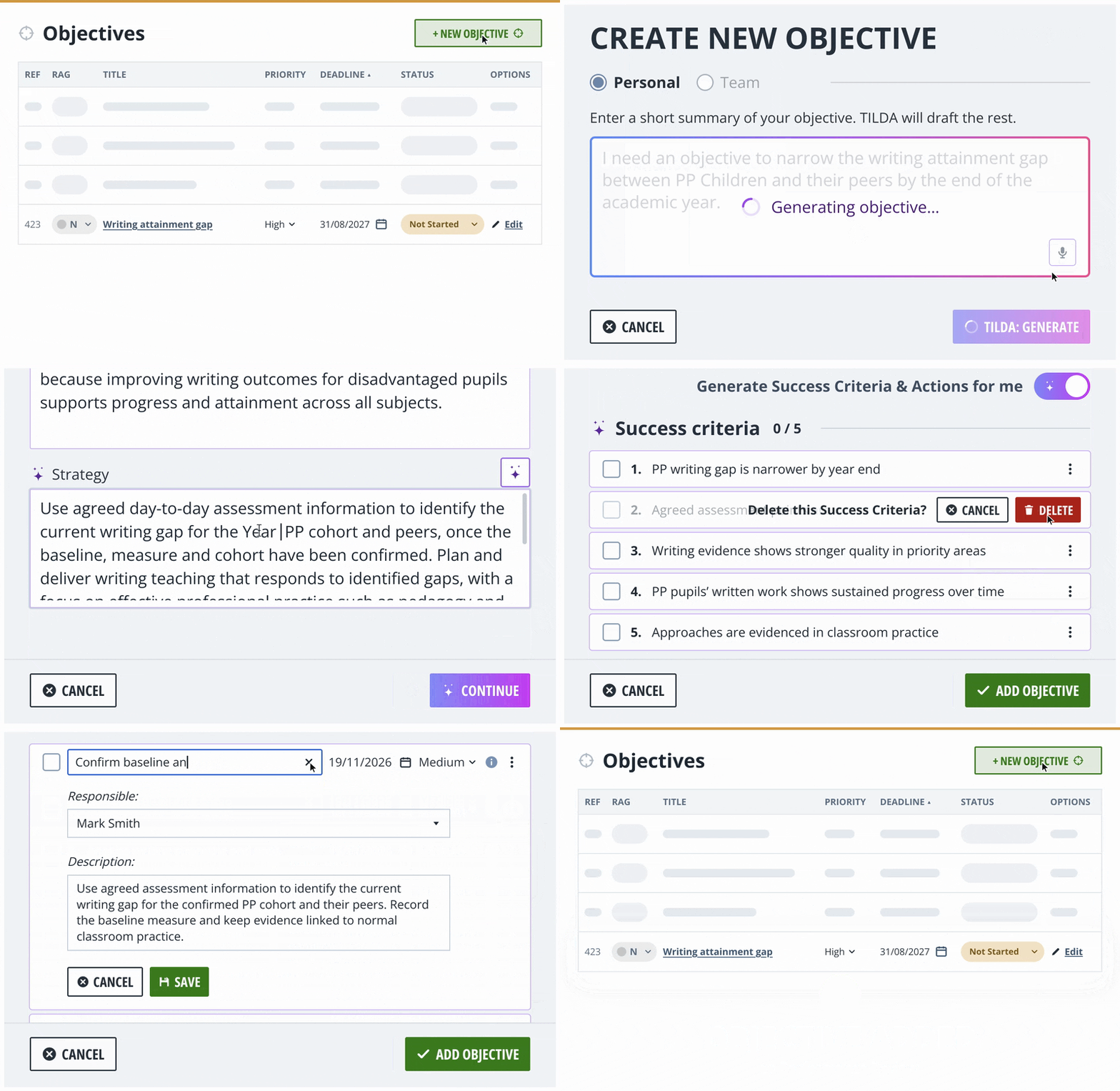
1. Create new Personal Objectives with TILDA
Creating a Personal Objective doesn’t always start with knowing exactly what you want to say. Sometimes you know what you want to achieve, but finding the right words to turn that into a clear objective takes time.
Tell TILDA what you want to achieve, and she’ll generate a suggested objective, complete with a Title, Description and Strategy. You can then review, refine and adapt it to suit the person and their role.
2. Bring your objective to life with Actions and Success Criteria
Once you’ve created your objective, TILDA can help you take it further by suggesting Success Criteria and Actions to support what you want to achieve.
Review the suggestions, make any changes you need and shape them around the individual’s role and development needs.
3. Review, make any tweaks and set it to In Progress
TILDA will pre-populate the deadline, ready for you to review and make any final tweaks to the Success Criteria, Actions or deadline. You stay in control of the final details and decide when your objective is ready to move to In Progress.
4. See more detail behind suggested Actions
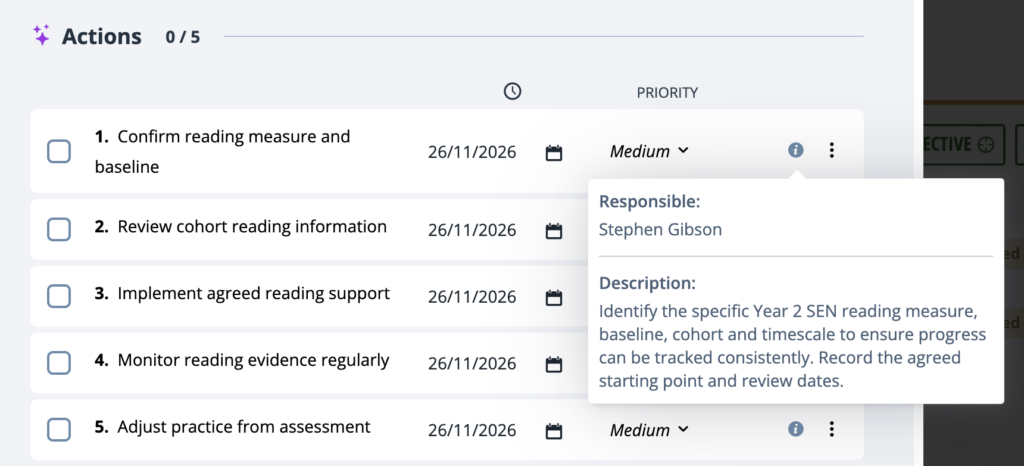
There’s more to TILDA’s suggested Actions than the titles you first see. Each includes a fuller description of what’s involved in working towards your objective. Simply hover over the (i) icon to see the detail behind each Action.
Keep the momentum going with TILDA
Already completed your Performance Management Reviews? You can still bring TILDA into the process, even if you’ve agreed your Personal Objectives. Perhaps you’ve got the objective in place but still need to develop the Description, Strategy or Success Criteria.
Simply revisit it and ask TILDA to help fill in the detail, refine the wording or suggest Actions to support what you want to achieve.
And if priorities change during the year, you can use TILDA to help shape new Personal Objectives too.
Performance Management throughout the year
Performance Management doesn’t happen at the same time for everyone. While many teachers may have their reviews around September and October, other members of staff may have theirs at different points throughout the year.
Whether you’re setting Personal Objectives, reviewing progress or supporting teaching assistants with their development, TILDA can help you create and refine objectives whenever the need arises.
TILDA’s suggestions are informed by a range of relevant educational guidance, professional standards and statutory requirements. This includes DfE guidance on teacher appraisal and capability, the Teachers’ Standards and the Standard for Teachers’ Professional Development.
TILDA’s knowledge is kept up to date as guidance evolves, helping ensure her suggestions reflect current expectations and good practice.
Webinar Info
Want to see the latest Performance Management updates in action? Join us for a free webinar where we’ll walk you through the new features and show how they can support your school’s everyday processes.
We’ll be showcasing TILDA, your friendly AI assistant, and how she can now help you create Personal Objectives, Success Criteria and Actions directly within Performance Management Reviews.
Now that you’ve completed your Performance Management Reviews, it’s a great time to explore the analysis tools available in Perspective. During the webinar, we’ll walk you through the whole-school Performance Reviews analysis, Development Feedback trends and Professional Standards analysis. We’ll also show you how to access CPD needs, Objectives and Pay information to help you monitor staff development throughout the year.
Book your place and discover how these updates can make setting, managing and reviewing Personal Objectives easier.
Pick a slot below to reserve your spot.
Please check out our help guides or contact our Support Team if you need help. We hope you enjoy the latest updates, and we can’t wait to hear your feedback.
Ready to Log In?
Sign in now and see the updates for yourself.
Not currently a Perspective Premium user?
Join us for a demo and we will show you how our users are benefitting.
If you or any colleagues would like training on any aspect of Perspective or have any other questions, please, don’t hesitate to contact us.