

 Angel
Angel What’s new in Perspective: TILDA & Performance Management Improvements
Self-Evaluation to School Improvement with TILDA
So, how does it work in practice?
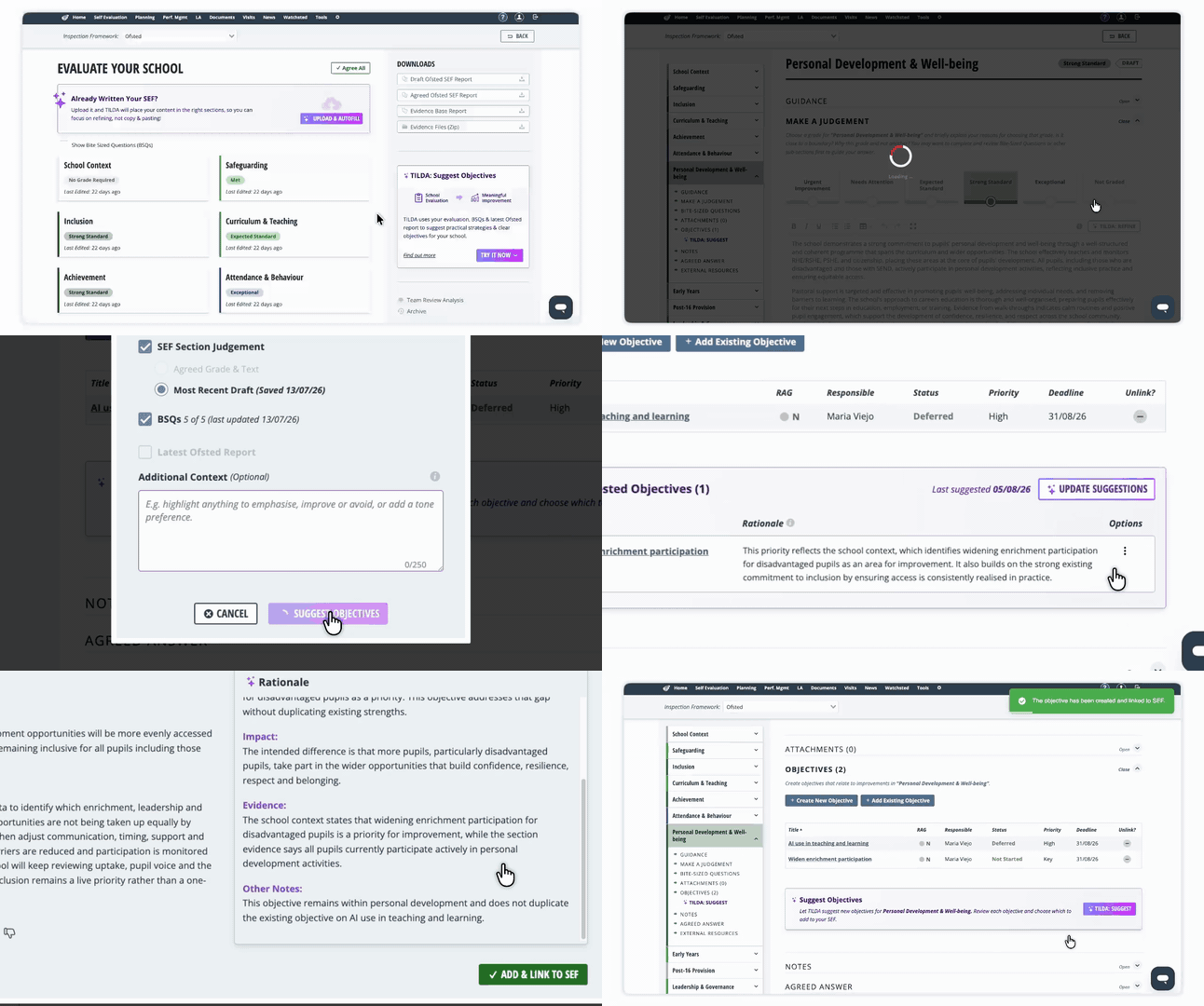
From any answered section of your Ofsted SEF, you can ask TILDA to suggest relevant improvement Objectives based on what you’ve already written.
TILDA presents its suggested Objectives alongside the relevant section of your SEF, so you can decide what you’d like to do with each one.
For every suggestion, you can:
- Review the suggestion in more detail
- Add and link it as an Objective directly to that section of your SEF
- Remove the suggestion if it isn’t right for your school
Nothing is added automatically – you decide which suggestions to take forward.
Once you’ve chosen an Objective, TILDA can help you develop it further, with suggestions for the title, description, strategy, along with success criteria and actions, all without leaving your SEF.
You stay in control throughout, with TILDA helping to save time, structure your thinking and reduce the effort involved in getting started.
Talk to TILDA when creating Objectives
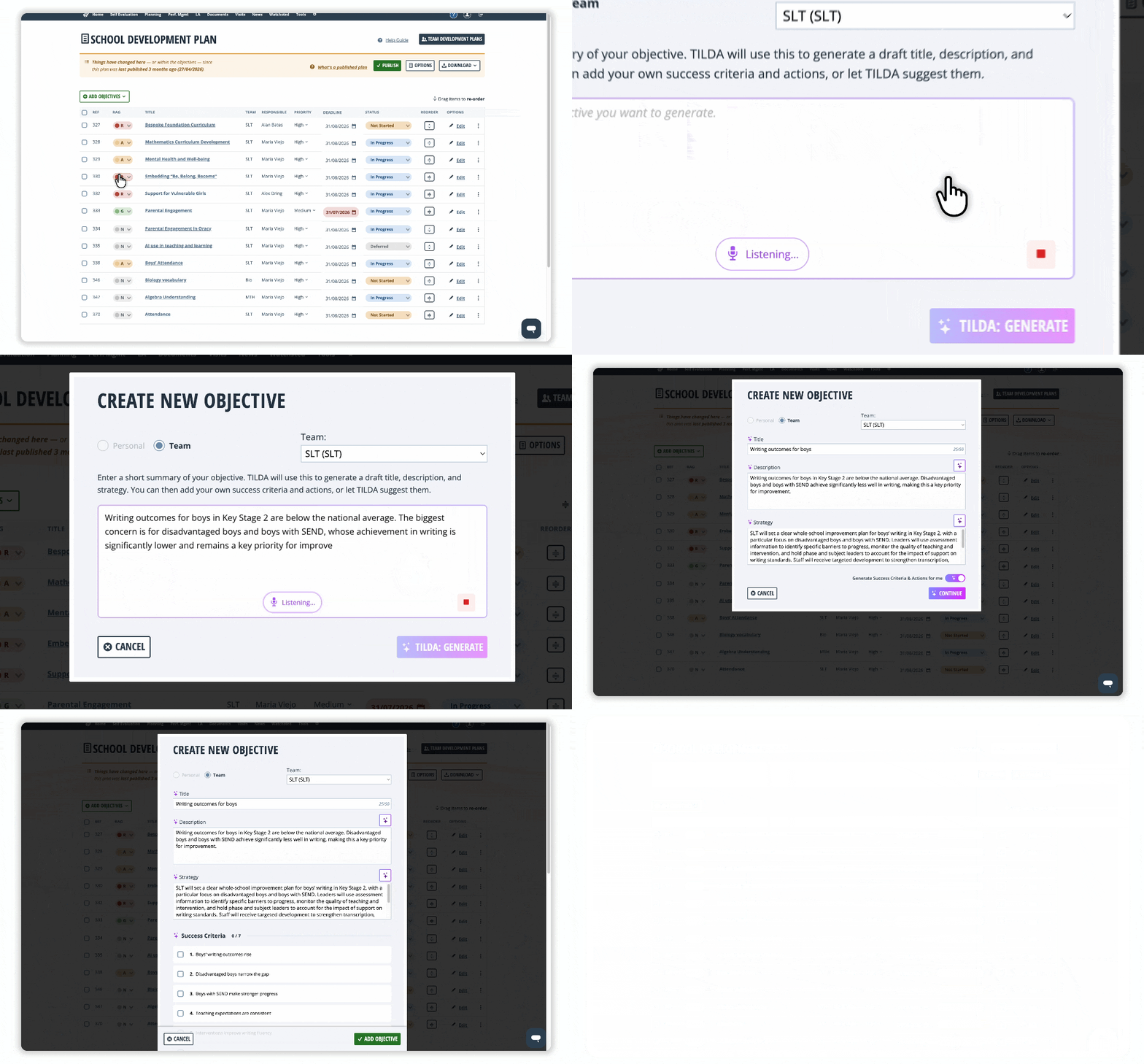
Sometimes it’s easier to say what you want to achieve than type it.
When creating an Objective from either Self-Evaluation or your School Development Plan, you can now simply select the microphone and talk to TILDA.
Explain what you want to achieve in your own words – just as you might describe it to a colleague. TILDA will use what you’ve said to help create a structured Objective, with a clear Title, Description and suggested Strategy.
It’s a quicker, more natural way to get your thoughts down – and a great way to get started when you know what you want to achieve, but aren’t quite sure how to put it into words.
An Updated Performance Management Experience
We’ve given key areas of Performance Management a major refresh, making it easier to navigate, review and analyse performance as you prepare for the new appraisal cycle.
This is the first phase of a wider Performance Management update, shaped by feedback from schools and designed to put the information you need at your fingertips – with less time spent navigating between pages or running reports.
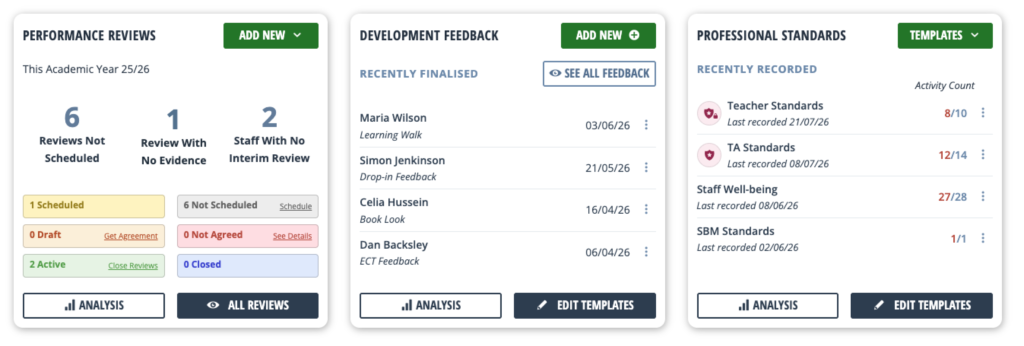
A new Performance Management dashboard
Your refreshed dashboard gives you a clearer overview of Performance Management across your school, with contextual information, recent activity and quick access to the areas you use most.
We’ve also streamlined some of the administration, reducing clutter and making everyday tasks quicker to find and complete.
See and manage all your Reviews in one place
Our updated All Reviews page gives you a single place to see Performance Management reviews across your school.
Quick filters help you find the people and reviews you need and move straight to the appropriate action – making it much easier to keep on top of your appraisal cycle.
More powerful analysis – right on screen
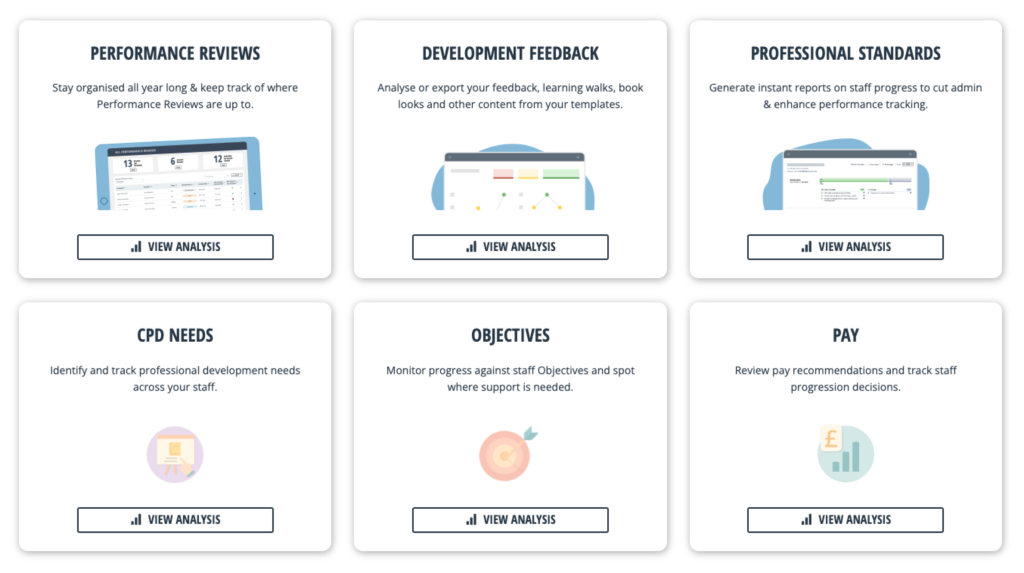
We’ve refreshed Performance Management analysis to make it easier to explore your information on screen, rather than having to rely on traditional reports.
You can now more easily explore:
Performance Reviews – a brand NEW analysis tool to help you see exactly what is going on across your school
Development Feedback – including NEW aggregations and trends over time
Professional Standards – analyse performance against your chosen standards
CPD Needs – now brings together CPD from both active and closed reviews, with CPD Needs Summary and CPD Impact reports still available to print
Performance Objectives – with easier access to Objectives by Reviewee, the Objectives Update Log and a new “Last Updated on” column
Pay – explore pay information on screen, while retaining access to existing reports
Together, these changes give you a clearer picture of performance across your school – helping you spot trends, identify development needs and move from insight to action more quickly.
Webinar Info
See the August release in action and discover how the latest Perspective enhancements can help you move from evaluation to action and prepare for the new academic year.
We’ll cover:
- Using TILDA to suggest and develop your school improvement Objectives – from initial suggestions through to strategies, success criteria and actions
- Talk to TILDA – use our new voice-to-text feature to say what you want to achieve rather than type it
- Exploring the refreshed Performance Management experience – including the new dashboard and All Reviews page
- Getting more from your Performance Management data – with improved on-screen analysis across Development Feedback, Professional Standards and Pay, plus improvements to CPD Needs and Performance Objectives
- What’s changed in Performance Management – and where to find the features you already use
Pick a slot below to reserve your spot.
Please check out our help guides or contact our Support Team if you need help. We hope you enjoy the latest updates, and we can’t wait to hear your feedback.
Ready to Log In?
Sign in now and see the updates for yourself.
Not currently a Perspective Premium user?
Join us for a demo and we will show you how our users are benefitting.
If you or any colleagues would like training on any aspect of Perspective or have any other questions, please, don’t hesitate to contact us.